
You don't know what is newest database? Don't now which is dateabase for your kaspersky version? Just use this software.Kaspersky Updater you can easyly update Offline for Kaspersky,Support all verison.You just choose your version and click.After download database will appear in Folder "Updates".

After have database, you can follow these step:

Open application and select settings.
Select Updates and then again settings.
Under the Additional tab, select the option “Copy Updates to folder” and give a path where you would like to store the update files.
Update your Kaspersky product and the updates will be copied to the folder you specified in previous step.Copy all the files of that folder to any computer which you would like to update and then proceed with the following steps.
Installing Updates
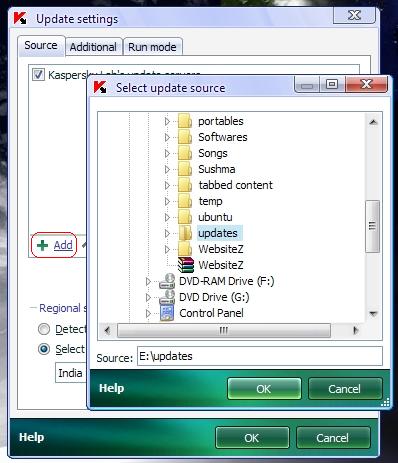
Open application and select settings.
Select Updates and then again settings.
Under the Source tab, Add a source and specify the path where the update files are located on this computer.
Now manually try to update it and it will update itself from the update files you just specified.If you face any trouble in updating Kaspersky then let me know and I will try to help you out. Have your say in the comments.Or see this animated image:
.gif)


No comments:
Post a Comment